Showing posts with label Software. Show all posts

Thursday, 6 December 2012

Scan Suspicious Files with Different Antivirus Engines Online


Scan Suspicious Files with Different Antivirus Engines Online


Suspicious files are all over the internet, you download something and you come across another virus or malware which is totally unknown to your Antivirus Engine, so that does not make any sense that you are having the best Antivirus Engine in the world but sometimes that too fails to detect that kind of virus. So what we can do in that case well we go for something which can search your file using all Antivirus Engine available.
That’s right searching and scanning for malware and viruses through all Antivirus Engines together can be done really easily with VirusTotal. So what VirusTotal says on about them.


VirusTotal is a service that analyzes suspicious files and URLs and facilitates the quick detection of viruses, worms, Trojans, and all kinds of malware detected by antivirus engines.


So now this is what you will see when you will visit their website a simple online file Uploader where you can submit a file or scan a website or File through URL. You can also see a Service Load text written above in the image that simply scans the whole traffic on their website and tell you that how much load they have on their server.

Now theirs a small problem with this service that they have a file size limited to 20MB per file, so from my point of view that’s good because it makes their website free for everyone as they do not have much load on their server.

So now click on Choose File and than click on Send File and you will see another window light boxed in front of you saying something like below .:


So now your file is being upload and they will scan your file with their all Antivirus Engines and brief your results in few seconds like below .:


So now you can see that how many Antivirus Engines have detected this file as an virus and of which category. So from the above image you can see that 5 Antivirus out of 43 detects it as a Virus so now if you want to see which Antivirus is detecting it and in which category than click on View Last Report.


Wednesday, 5 December 2012

Finally, Apple iTunes store is in India, buy a song for Rs 7


Finally, Apple iTunes store is in India, buy a song for Rs 7


After a long long wait, Apple on Tuesday finally extended the iTunes Store to India offering consumers the ability to purchase music, buy or rent movies.

The all-new website for iTunes store greets you with the message, “Now you can shop at the world’s No.1 music store. Which means you can browse and buy songs, albums and films anytime you want.”

Services:

                             
Until now, the Indian iTunes Store only featured some free books and podcasts. But now, you can buy everything–from Bollywood songs, Tamil film songs to even international music from all major labels.

Apple also launched its iTunes Match service in India, which allows users to store music, bought from sources other than iTunes, in iCloud. This service is priced at Rs 1,200 per year.

But, there are no TV shows listed, unlike various other international markets. And that’s the only disappointment so far.

Price:

Compared to other countries, pricing in India seems pretty reasonable. Single songs are priced between Rs 7 and Rs 15 and albums start from Rs 70. [On Flipkart, a single song costs you Rs 15]

Similarly, most movies are available for rent at Rs 80 in SD (Rs 120 in HD) and buy for Rs 290 in SD (Rs 490 in HD).

The iTunes Store debuted as the US-only iTunes Music Store in April 2003. It has since expanded to include movies and TV shows and until today was available in approximately 97 countries. In June, it added 12 Asian countries including Hong Kong, Singapore, Taiwan. But India did not feature in that list.

Check out the new Apple India iTunes store here.

For Android users: Log into FB Messenger with only name, mobile no

For Android users: Log into FB Messenger with only name, mobile no!


Facebook’s Messenger app for Android just got a a serious new upgrade. Users in India, Indonesia, Venezuela, Australia and South Africa can now sign up for the Messenger service with just their name and mobile number. Previously, to log into Facebook Messenger, you had to use your Facebook account.

Facebook made the announcement on their Newsroom.  Read It:

Starting today, you can create a Messenger account with just your name and phone number, and start messaging your mobile contacts.

Just install the app and tap Get Started to reach your contacts faster, start group conversations, share photos and more.

The app will then find your contacts who are using Messenger.

This change should put to rest all rumours of Facebook buying out WhatsApp. But what is evident is that Facebook is hoping to put up Messenger as a serious rival to WhatsApp.

The new Messenger allows users who don’t have a Facebook account to use the Messaging service and this is clearly part of Facebook’s strategy to expand into mobile.

As Facebook’s Q3 results for 2012 showed that mobile ads had finally worked for the site and helped bring in nearly 14 percent of the revenue for the site came from mobile ads. “I want to dispel this myth that Facebook can’t make money on mobile,” said CEO Mark Zuckerberg in a conference call with analysts. “This may (have seemed) true earlier this year because we hadn’t started trying yet.”

Clearly by making Messenger accessible to non-Facebook users on Android, Zuckerberg is sending out a strong message that the mobile arm of the social networking giant is only going to get bigger.

Monday, 23 April 2012

How to Download Facebook Friends Photo Albums

FacePAD: Facebook Photo Album Downloader allows you to download your friends’ facebook albums, Events albums, and Group Albums, en masse, with the click of a button.


Sunday, 22 April 2012

Tweak your Right Click Menu with Right Click Tweaker


Right Click Tweaker for windows can be used to add some more options to increase your overall work output, you can add some essential daily used shortcuts so that whenever you are doing your work and you need that specific options than you can use it easily.

Applying tweaks is really easy with right click tweaker tool, you just select the options you wanna add in your right click and click on Apply Tweaks and those options will be added automatically.

Features of Right Click Tweaker :

1. Copy To Folder & Move To Folder :- When you choose one of the options from the menu, you browse to any place on your hard disk to copy or move the file to that folder. You don't have to navigate to the place where you want to paste your file.

2. Create or Print File List :- Allows you to print or create file list of a folder by right clicking on folder and selecting one of the option.

3. Encrypt & Decrypt :- Allows you to encrypt and decrypt your files and folders. Files encrypted can´t be operable by another user on the PC.

4. Open In Notepad :- Allows user to open any file in notepad by just right clicking it.

5. Open file location :- Allows user to open the file location by right clicking its shortcut.

6. Administrator Command Prompt :- Allows user to open an elevated command prompt with highest privileges from any folder by right clicking it.

7. God Mode & System Configuration Utility (Vista or 7) :- Add the options to open System Configuration Utility(msconfig) and famous god mod from user´s right click menu.

8. Problem Step Recorder (Windows 7) :- Problem Step Recorder is a hidden feature of the Windows 7. This tool bring this to your right click menu.

9. Take Ownership (Windows 7 or Vista) :- Allows user to take ownership of files and folders owned by other users on computer.

10. Copy Content To Clipboard :- Allows user to copy content of text files just by right clicking it.

11. Search and Replace :- Allows user rename multiple files in a folder at once.

Download Right Click Tweaker for Windows :

If you like all the features of this little utility than you can download it form RBSoft official weebly website using this download page link, hope you like this tool if you find any problem do comment.

Thursday, 19 April 2012

Free Download Internet Cell Boost 3.0.0 Latest Full Version And Improve Your Internet Speed 100%


While the theoretical maximum transfer speed of
your Internet & Network Connection cannot be changed
except by upgrading your hardware or Internet Subscription,
Internet Cell Boost can effectively increase the performance of your existing configuration.

By using Internet Cell Boost you will benefit from:-
  • Faster download speed and improved website browsing. 
  • Parallel sever connections and concurrent downloads. 
  • A much smoother multimedia streaming experience. 
  • Optimized configurations for Mozilla Firefox and Internet Explorer. 
  • Improved LAN, WAN and VPN performance. 


Here are some key features of "Internet Cell Boost":-
  • · Optimize your Network & Internet connection by applying various tweaks that will help you get the most out of your subscription package & hardware. 
  • · Works on all types of connections including DSL, Cable Modem, Satellite, GPRS, UMTS, HSDPA, WiMax, Dial-Up, ISDN and closed Networks. 
  • · Monitor your connection with the built-in Monitoring System, specifically designed to help you examine the performance that your connection is currently achieving. 
  • · Optimize your connection for peak performance or restore everything back to default with the touch of a button. 

Requirements:-

  • · 300 MHz CPU Speed 
  • · 16 Megabytes of installed RAM 
  • · 20 Megabytes free hardisk space 
  • · Internet Connection 
  • · Internet Connection 

What's New in This Release:-

  • · Lite Edition has been phased out and replace by a Free Edition with the optional possibility to upgrade to Premium. 
  • · A completely redesigned intuitive graphic user interface has been implemented. 
  • · Revised MTU, MSS & RWIN adjustments to accommodate the latest data rate capabilities. 
  • · Added the ability to adjust the Bandwidth Reserved for Window's Quality Of Service (QoS). 
  • · Added the ability to optimize the Datagram Size. 
  • · Added the ability to optimize the Fast Copy Receive Threshold. 
  • · Time To Live has been adjusted to accommodate either 32, 64 or 128. 
  • · Added the ability to optimize Local Network Connections. 
  • · Mozilla Firefox optimized configurations has been revised to accommodate the latest specifications. 
  • · Added the ability to optimize 'nglayout.initialpaint.delay' for Mozilla Firefox. 
  • · Added the ability to optimize 'content.notify.backoffcount' for Mozilla Firefox. 
  • · Added the ability to optimize 'ui.submenuDelay for Mozilla Firefox. 
  • · Added the ability to optimize 'plug...
 *Download From Here:-

Internet Cell Boost 3.0.0
Internet Cell Boost 3.0.0 Key

Saturday, 14 April 2012

Download Windows 8 Consumer Preview Public Beta


Microsoft has finally released the much waited Windows 8 Consumer Preview, the Public Beta version of upcoming Windows 8 Final OS. Now you can download and install it on your computer system. Get the direct download links and original genuine product key here.

This Windows 8 Consumer Preview beta build will give you better performance and lesser bugs in compared to the previous Developer Preview version. Enjoy all new look and feel of the upcoming great operating system from Microsoft Windows 8 with new login screen, better Start Screen and lots of uncounted features.

System Requirements for Windows 8 Consumer Preview

According to Microsoft, Windows 8 Consumer
Preview works great on the same hardware that
powers Windows 7-
~Processor 1 gigahertz (GHz) or faster
~RAM: 1 gigabyte (GB) (32-bit) or 2 GB (64-bit)
~Hard disk space: 16 GB (32-bit) or 20 GB (64- bit)
~Graphics card: Microsoft DirectX 9 graphics
device or higher~To use touch, you need a tablet or monitor that
supports multitouch
~To access Windows Store and to download and run apps, you need an active Internet connection
and a screen resolution of at least 1024 x 768
~To snap apps, you need a screen resolution of
at least 1366 x 768.

Product Key - DNJXJ-7XBW8-2378T-X22TX-BKG7J

~~~~~~~~~~DOWNLOAD~~~~~~~~~~

32 BIT - 2.5GB

SINGLE LINK - Click Here

IN PARTS (400 MB)

Part 1 - 400 MB
Part 2 - 400 MB
Part 3 - 400 MB
Part 4 - 400 MB
Part 5 - 400 MB
Part 6 - 400 MB
Part 7 - 185 MB

--------------------------------------------------

64 BIT 3.3 GB

SINGLE LINK - Click Here

IN PARTS (400 MB)

Part 1 - 400 MB
Part 2 - 400 MB
Part 3 - 400 MB
Part 4 - 400 MB
Part 5 - 400 MB
Part 6 - 400 MB
Part 7 - 400 MB
Part 8 - 400 MB
Part 9 - 217 MB

DON'T FORGET TO HIT LIKE.

Thursday, 12 April 2012

Kaspersky Antivirus 2013 Beta 90 Days Trial Download


If you are computer geek and you browse internet on daily basis than you might have noticed that in the online world where you get everything right on your screens easily, you are also greeted with many online viruses and spywares so you will a perfect warrior for protecting you from all this crap, well comes the role of antivirus and who can forget the worlds widely used Antivirus Engine Kaspersky which can protect you from all these threats.


Download Kaspersky Antivirus Free for 90 Days :

Now if you wanna download and use Kaspersky Antivirus free for 90 days, than you can download its beta version for free from Kaspersky’s official devbuild page which provides a direct link to the downloadable package. So download and install the antivirus in normal way and you will have a fully functional 90 days version ready for ultimate protection.

Hope you liked this post make sure to like it and share it with your friends.

Friday, 30 March 2012

Add Uninstall Option In Right Click Context Menu


If you have to uninstall a program you have to navigate to Control Panel,then to Uninstall a program menu.Now locate the program that you want to remove.This is very lenghty an irritating process for those who regularly test new softwares.Now you can add Uninstall option in your right click menu with a freeware utility MenuUninstaller

Using Menu Uninstaller you can uninstall any program with a single right click on its shortcut.It is compatible with windows xp,Vista and windows 7.


How To Add Uninstall Option In Right Click Context Menu:-
  • Download Menu Uninstaller by clicking here
  • Click on the setup to install it in your PC.Installation process is fairly simple (Just Follow Guidelines)
  • Now Uninstall option will available in right click menu.
  • To remove any program simply right click on its shortcut and select Uninstall Option

Open Multiple File Formats (75+) With Single Software


Is your Computer running too slow due to large number of applications which are installed.If you install a specific software for each file format you will end up with a lot of bloatware.It is a pain for a lot of users to install different softwares for different file formats after installing a fresh copy of their OS.You can save yourself from this trouble by installing a freeware application that is capable of opening multiple file formats (75+ formats).

It can give a breath of life to those systems which have low memory.Moreover it can be a lifesaver if you don’t have an idea about how to open a particular file extension, Just give it a try with Free Opener.
Supported File Formats

Code Files (.vb, .c, .cs, .java, .js, .php, .sql, .css, .aspx, .asp)

Web Pages (.htm, .html)

Photoshop Documents (.psd)

Images (.bmp, .gif, .jpg, .jpeg, .png, .tif, .tiff)

XML Files (.resx, .xml)

PowerPoint Presentations (.ppt, .pptx, .pps)

Media (.avi, .flv, .mid, .mkv, .mp3, .mp4, .mpeg, .mpg, .mov, .wav, .wmv, .3gp, .flac)

Microsoft Word Documents (.doc, .docx)

SRT Subtitles (.srt)

RAW Images (.arw, .cf2, .cr2, .crw, .dng, .erf, .mef, .mrw, .nef, .orf, .pef, .raf, .raw, .sr2, .x3f)

Icons (.ico)

Open XML Paper (.xps)

ML Paper (.xps)

Torrent (.torrent)

Flash Animation (.swf)

Archives (.7z, .gz, .jar, .rar, .tar, .tgz, .zip)

Rich Text Format (.rtf)

Text Files (.bat, .cfg, .ini, .log, .reg, .txt)

Apple Pages (.pages)

Microsoft Excel Documents (.xls, .xlsm, .xlsx)

Comma-Delimited
(.csv)

Outlook Messages (.msg)

PDF Documents (.pdf)

vCard Files (.vcf)

EML Files (.eml)

Click here To Download Free Opener (25 mb)

How To Download Entire Website And Access Offline:Surfoffline


Everyone has some specific favourite websites which they check regularly to stay updated.You can subscribe to its RSS feed via email to get the updates delivered directly into your inbox or if you don’t want too fill your mailbox then you can bookmark it into your browser. But what if you are going on business trip or vacation and doesn’t have internet access there.

In such cases its best to have the offline version of the website so that you can have access to its earlier articles or content. by using Surfoffline Software you will download entire website within few minutes and ready to access in offline mode.You can also transfer it into portable media like Pendrive or CD’s without any hassle.


Surfoffline is compatible with all versions of windows including Xp, Vista and windows 7.You need not to worry even if you have Dial up connection as surfoffline is only 2mb in size and the installation process doesn’t require any special steps. Surfoffline has its own browsing interface and the offline website can be exported into a folder, CHM format or MHT web achive.

NOTE:-If you don’t want to download entire website you can limit it to specific pages which you want to access in offline mode
NOTE :- The content of the downloaded website will not update as the website updates.


Main features of Surfoffline are

  • Downloading up to 100 files simultaneously.
  • Downloading up to 400000 files in one project.
  • It allows to Download entire website (including images, video, audio, etc.) for access in offline mode.
  • Preparing downloaded websites for writing to a CD and DVD
  • Downloading password protected web pages and password protected websites (HTTP and FTP authentication)
The built-in browser and the support of sessions and cookies allow you to download sites protected with web form passwords.

To export and surf the website offline in CHM format you need to have registered version of Surfoffline.

Click here to download Surfoffline and access entire website in offline mode.

NOTE –Surfoffline software is a 30 days trial version and if you are willing to get full version purchase it.

Tuesday, 27 March 2012

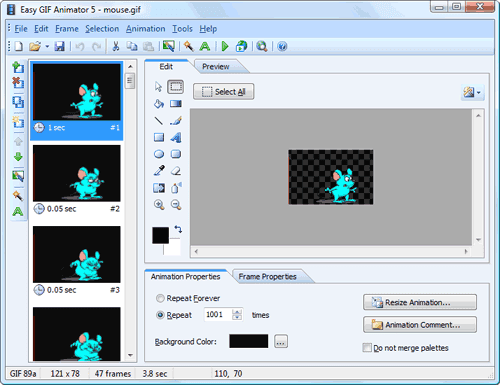
Create Animated GIF Images with Easy GIF Animator


Now you can create animated GIF Images for your websites, banner or any other stuff using Easy GIF Animator, the software is what it sounds. You get a very nice and clean interface for creating your GIF Images and giving them life. You can create banners, animated buttons and much more just by applying your creative skills. You can add awesome visual effects and much more with this software.


Download Easy GIF Animator for Windows :

You can Download Easy GIF Animator software for windows and start making your own animated text, banners and awesome creations.

Internet Download Manager 6.11 Beta Full Download


New Features and Improvements in IDM 6.11 Beta Version :
                                            idm-6.11-beta
1. IDM 6.11 Beta comes with added support for Firefox 13.
2. It also comes with added support for SeaMonkey 2.8.
3. Advanced Browser Integration has been improved.
4. Lots of Bug Fixes.

Download IDM 6.11 Beta Full Version :

Obviously you will not get this update when you will check for updates in your preinstalled internet download manager as it’s a Beta version, so you can Download IDM 6.11 Here and than install it like you do normally. The package is .rar so you will need WinRAR to extract it, after the extraction just install IDM using the setup provided and than patch it up like in the earlier version.

You can also use IDM Cracker Tool for patching it up, and IDM Optimizer for boosting your Internet Download Manager speed.

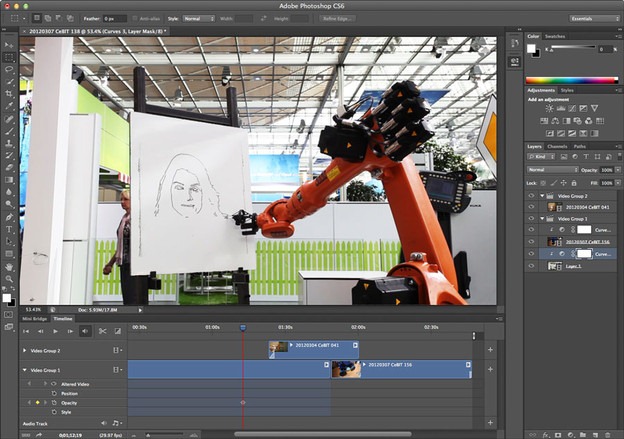
Adobe Released Photoshop CS6 Beta Download Now

The worlds best image editing and manipulation software Photoshop is now going to get even more better with its brand new CS6 version. CS6 version has brought some performance enhancements, some image editing tools are also updated for some superior fun.

Photoshop-CS6-Beta


Photoshop CS6 Highlights :


1. Content Aware Patch : Now you can patch images with great control and stability with new Content Aware Patch tool. Just sampling an area and than see the content aware magic.

2. Faster Performance Enhancements : Now CS6 comes equipped with a Mercury Graphics Engine which makes it more stable when using tools like liquify, puppet warp and other major ones.

3. Re-Engineered Tools and Modern UI : Now CS6 tools and design has been re-engineered with some awesome improvements. Now creating marvelous designs with Photoshop CS6 is much fun.

For more detailed information on Photoshop CS6 Highlights and other features you can check out their official website.
Download Photoshop CS6 Beta Version for Windows and MAC :

You can Download Photoshop CS6 for both Mac and Windows for free from their official website. For Mac there is a DMG file 984MB and for Windows it’s a ZIP Package 1.7GB respectively. Hope you get the premium performance from this amazing new update form Adobe have fun and do share this post with all your friends.


SCROLL TO TOP